RankGrain SEO: A Lightweight All-in-One SEO Plugin for WordPress
Most WordPress bloggers install one of the big SEO plugins on day one, and that is a good start. But on a small blog on cheap hosting, a large SEO plugin can feel heavy: many screens, upsell notices, and features you will never use. I wanted something smaller for my own sites, so I built RankGrain SEO. It is a lightweight, all-in-one SEO plugin for bloggers: the whole plugin is about 215 KB, it adds no CSS or JavaScript to your front end, and every feature is a module you can switch on or off.
RankGrain SEO runs live on two of my own sites, banktollfree.info and creditcardinfo.online. All screenshots below are from the real plugin, version 2.0.0, on a demo blog.
What RankGrain SEO does
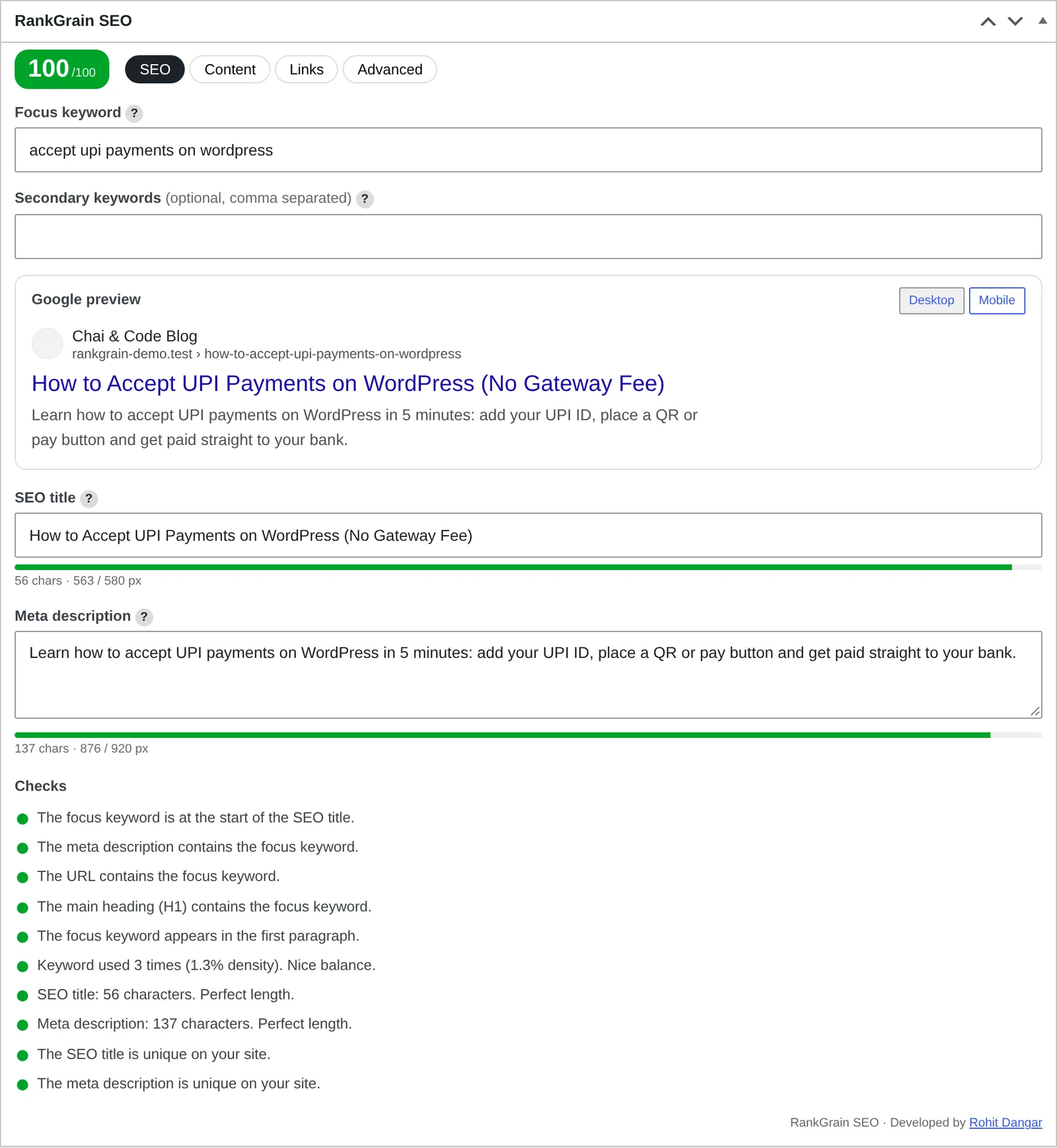
When you write a post, a RankGrain SEO box sits under the editor. You type a focus keyword, an SEO title and a meta description, and the box shows you, while you type, how the result will look on Google and how well the post is optimized.
- Focus and secondary keywords for each post.
- Live Google preview for desktop and mobile, with character and pixel bars so your title and description are not cut off.
- 10 SEO checks and a 0–100 score. Green, orange and red checks tell you what to fix. The score also shows as a column in your posts list, so weak posts are easy to spot.
- Content analysis: word count, subheadings, keyword in H2/H3, readability, links and images.
- Internal link suggestions: related posts from your own site, with a copy-link button.
- Advanced tab: noindex, nofollow, canonical URL, primary category, schema type, and the social share title, description and image.
Site-wide SEO features
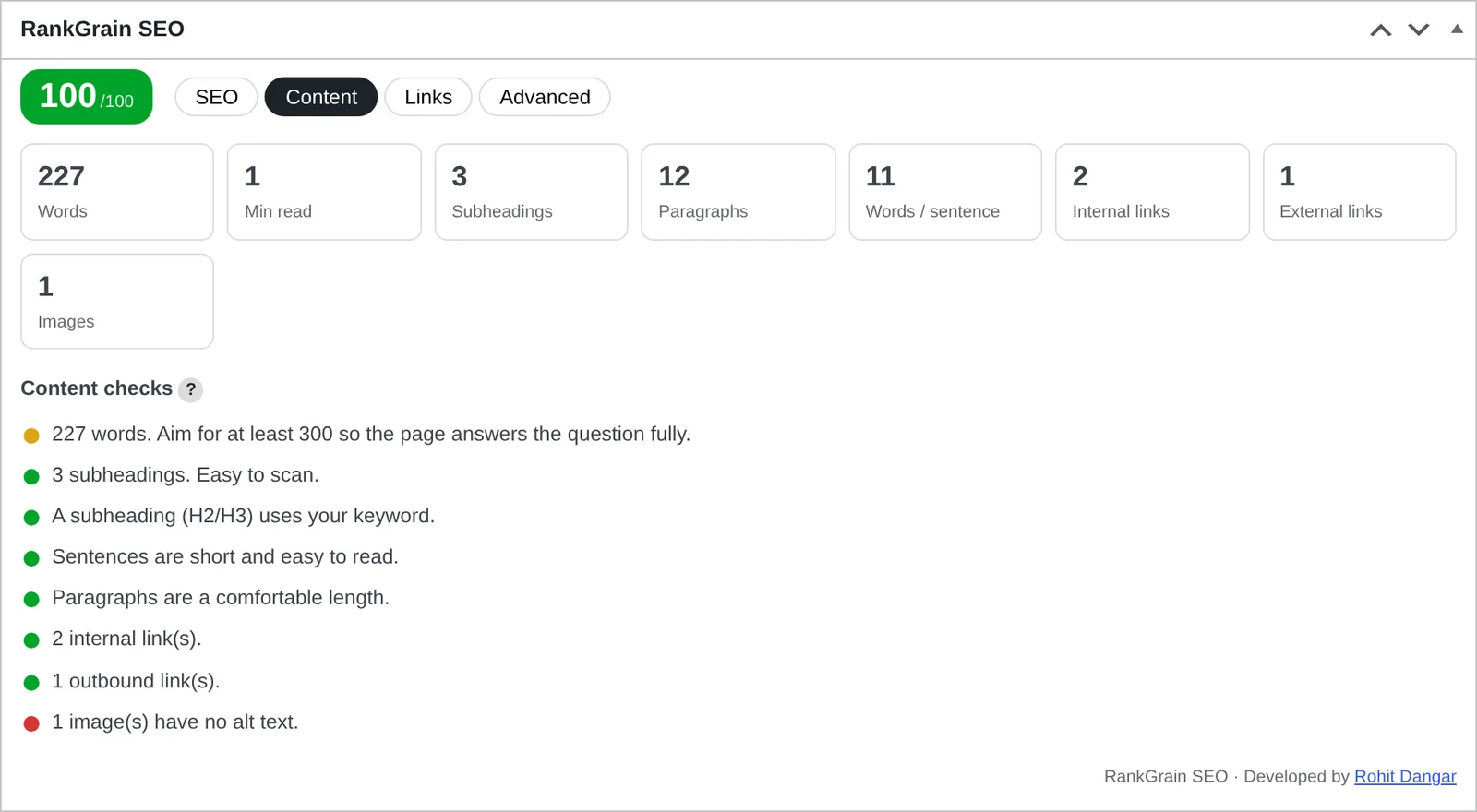
Beyond the post box, RankGrain SEO covers the site-wide basics a blog needs:
- Titles and meta: title templates, homepage title, separator, SEO title and description for each category and tag, and noindex for archive pages.
- XML sitemap and robots.txt editor. The sitemap is built on WordPress's own sitemap, so it stays small and theme filters keep working.
- Schema: Organization or Person, WebSite, Article, BlogPosting or NewsArticle, BreadcrumbList, and an FAQ block for the editor.
- Breadcrumbs through a shortcode or a theme function.
- Image alt checker that finds images without alt text and fills them in bulk.
- 3-step setup wizard on first install, and fix history with undo for every change the plugin makes.
Every feature is a module with its own on/off switch. A module you switch off loads no code at all.
Redirects, 404 log and broken links
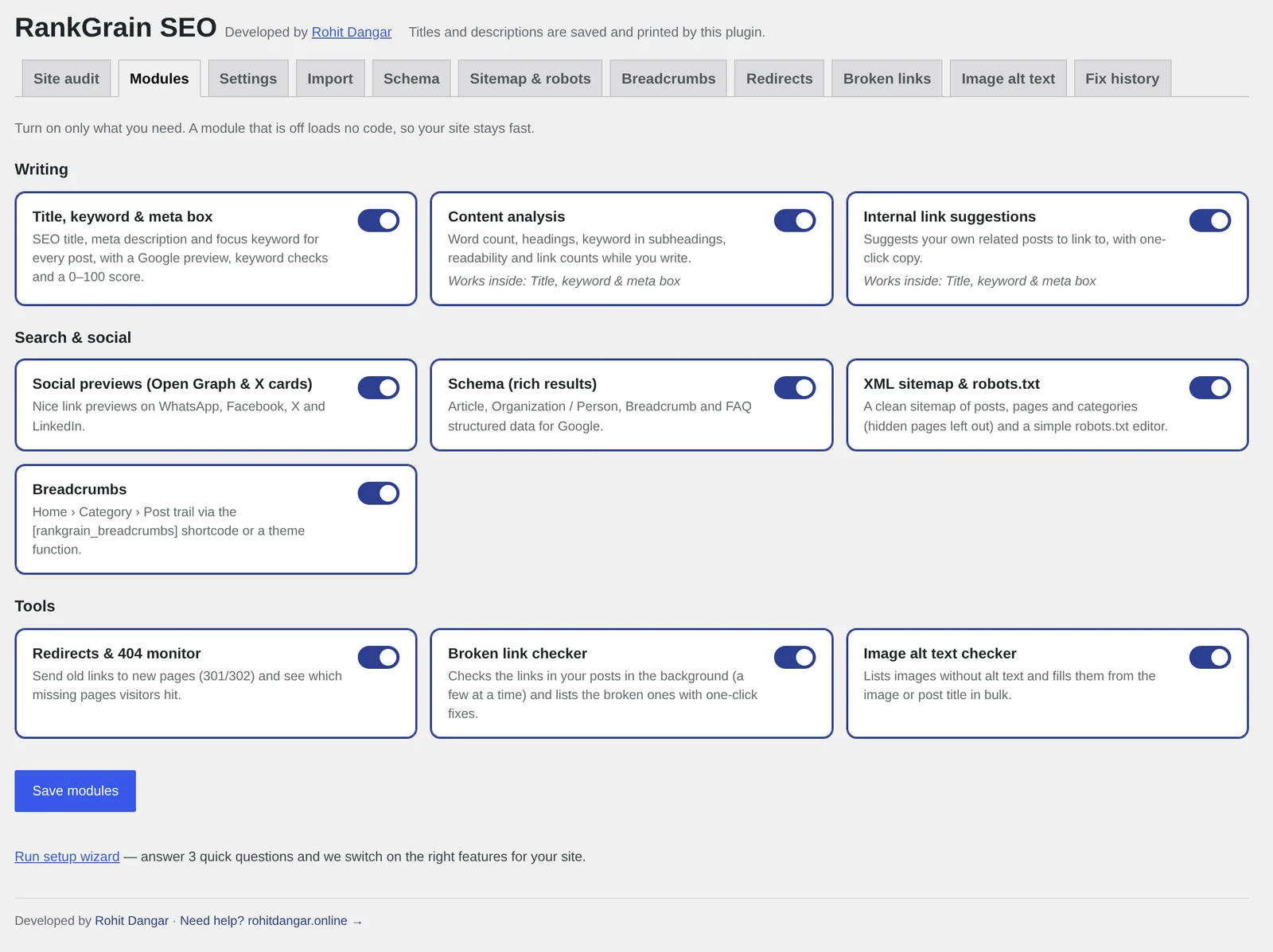
Old URLs and dead links quietly hurt a blog. RankGrain SEO has a redirects module with 301, 302 and 410 rules (regex too), plus a 404 log that shows which missing pages visitors hit and how often. One click turns a 404 into a 301 redirect. There is also an optional automatic 404 redirect to a similar post, with a fallback to the home page, a category or a custom URL.
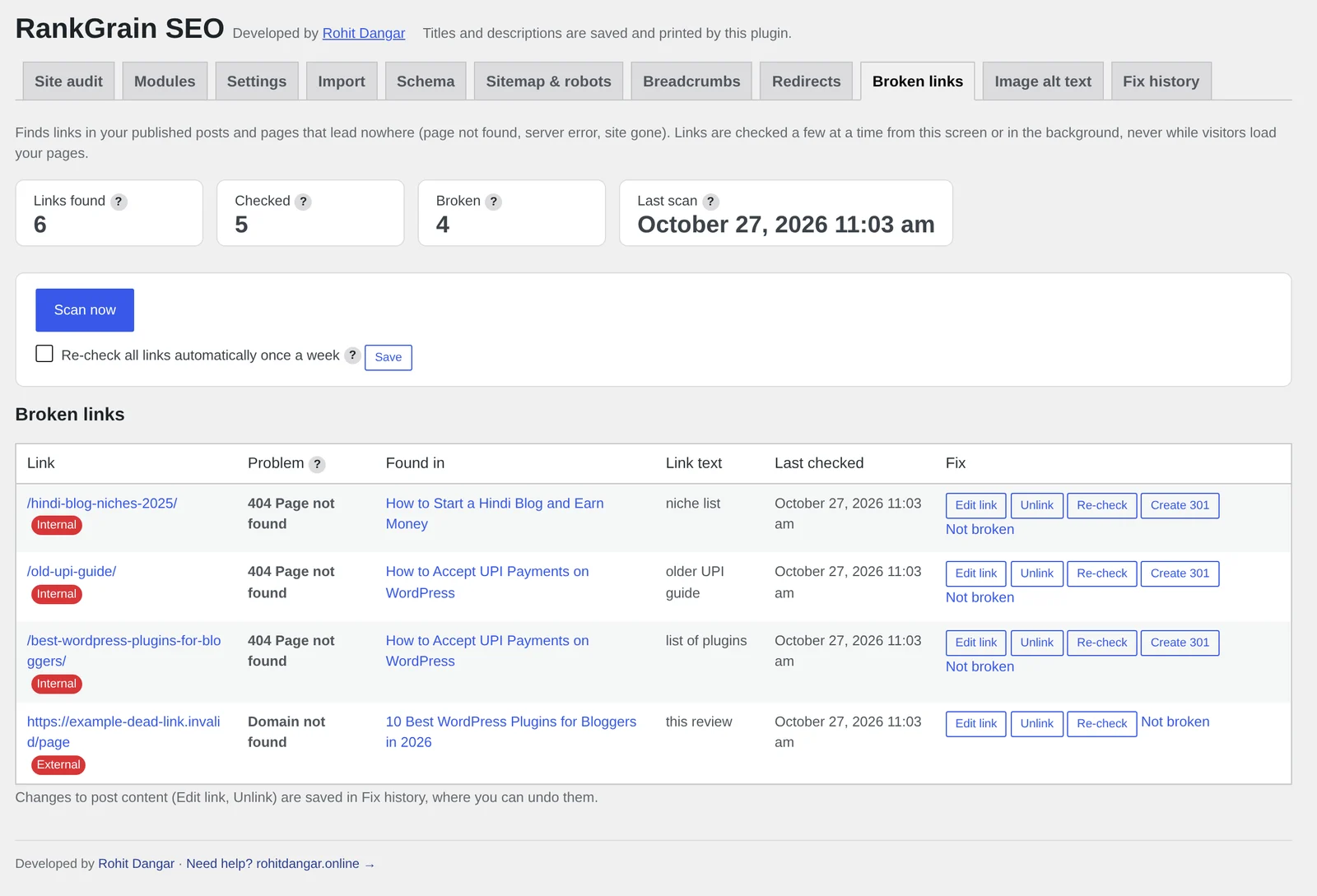
The broken link checker scans the links in your posts in small batches, from the admin screen or in the background, never during page views. For each broken link you can edit the URL, unlink it, or create a 301 redirect, and every change can be undone.
Switching from Yoast or Rank Math
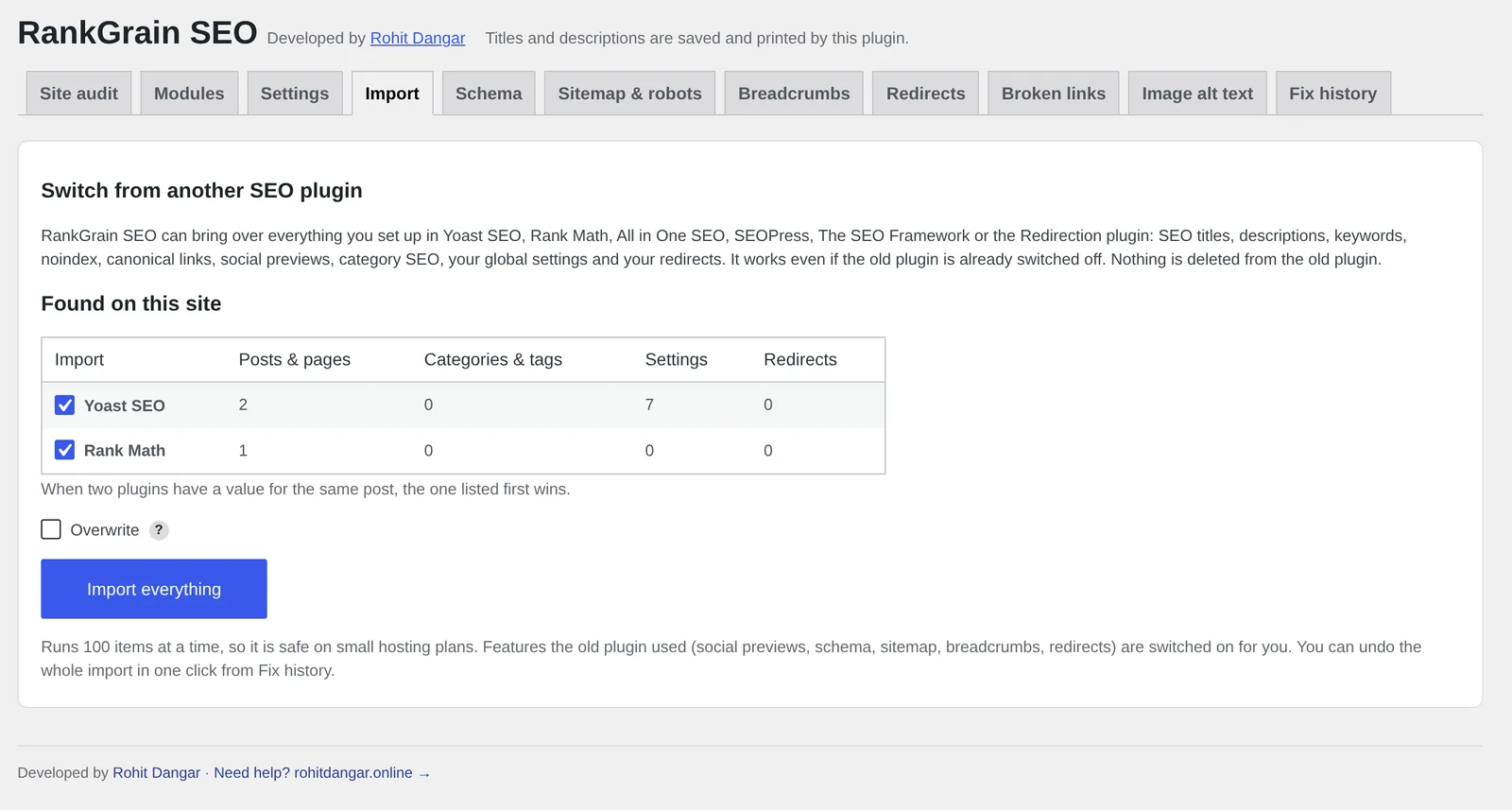
Changing SEO plugins usually means losing work: titles, descriptions and keywords typed into hundreds of posts. RankGrain SEO has a one-click "Import everything" tool. It detects data from Yoast SEO, Rank Math, All in One SEO, SEOPress, The SEO Framework and the Redirection plugin, even when those plugins are deactivated, and brings over post SEO data, category and tag settings, global settings and redirects.
You see a preview of what it found first. After the import, one click in Fix history undoes the whole run.
How to install RankGrain SEO
- Download the plugin zip and install it like any WordPress plugin (Plugins › Add New › Upload Plugin).
- Activate it. The 3-step setup wizard asks what kind of site you run, your name or logo, and which features you want.
- If you used another SEO plugin, open the Import tab, check the preview and click "Import everything".
- Open any post, add a focus keyword, and follow the checks until the score turns green.
RankGrain SEO vs Yoast SEO vs Rank Math
Yoast SEO and Rank Math are mature, popular plugins with large teams behind them. RankGrain SEO is not trying to match every feature they have. Here is an honest look at where they differ.
| RankGrain SEO | Yoast SEO | Rank Math | |
|---|---|---|---|
| Plugin download size | About 215 KB | About 5.2 MB (v28.8) | About 3.7 MB (v1.0.280) |
| Redirects and 404 log | Included free | Redirect manager is in Yoast SEO Premium | Redirections and 404 Monitor modules |
| Internal link suggestions | Included free | In Yoast SEO Premium | See Rank Math's plan comparison |
| Broken link checker | Included free, runs in batches | Not part of the free plugin | See Rank Math's plan comparison |
| Turn features off | Every module has a switch | Some features can be switched off | Module switches |
| Track record | New (v2.0), live on 2 of my sites | 10+ million active installs | 4+ million active installs |
Yoast SEO is the safe, well-known choice, with excellent documentation and a huge community. Some features bloggers want, like the redirect manager and internal linking suggestions, are part of Yoast SEO Premium.
Rank Math packs a lot into its free version, including redirects and a 404 monitor, and has many modules. It is a strong option if you want lots of features and don't mind a larger plugin.
RankGrain SEO fits if you want the essentials in one small plugin, with no front-end weight, and a simple way to move your old SEO data across.
Where RankGrain SEO falls short
- It is new. Yoast and Rank Math have years of testing on millions of sites. RankGrain SEO runs on my own sites today, so test it on a staging copy first.
- No keyword research or rank tracking. It does not connect to Google Search Console or show rankings inside WordPress.
- Not built for online stores. There is no WooCommerce product schema or local business SEO module yet.
Who should use it
RankGrain SEO fits bloggers and small content sites, especially on budget hosting, who want clean titles, descriptions, schema, a sitemap and redirects without a heavy plugin. If you run a large store or need rank tracking and keyword research inside WordPress, one of the bigger plugins will serve you better.
Try RankGrain SEO on your blog
Free download from this site. Questions or feature requests are welcome on WhatsApp.
Download RankGrain SEO Ask on WhatsAppSource check: 27 October 2026. Features and plans can change. Plugins page · Yoast SEO on WordPress.org · Yoast redirect manager · Yoast internal linking suggestions · Rank Math on WordPress.org · Rank Math 404 Monitor · Rank Math free vs PRO