WordPress Table of Contents Plugins Compared: Brisk Contents vs Easy Table of Contents vs LuckyWP
Long posts need a table of contents. Readers skim before they commit, and a clickable list of headings lets them jump straight to the part they came for. Google can also show those jump links in search results, which earns you more clicks on long guides. WordPress does not include a table of contents out of the box, so you need a plugin. This article compares three of them honestly: my own lightweight plugin Brisk Contents, and the two established free options, Easy Table of Contents and LuckyWP Table of Contents.
What to look for in a table of contents plugin
- Auto-insert: the table appears on every post without manual shortcodes.
- Editor block: you can drop the table exactly where you want it in the block editor.
- Weight: how much CSS and JavaScript it adds to every page load.
- Anchor handling: the links behind each heading. If you write in Hindi or Gujarati, this matters more than you think (more below).
- Price: all three plugins here have a free version on WordPress.org.
A quick note on setup
All three plugins install the same way: Plugins › Add New, search the name, install, activate. Easy Table of Contents and LuckyWP Table of Contents are on WordPress.org, so you can install them directly from your dashboard. Brisk Contents is downloaded from my store and uploaded as a zip, which takes one extra step. After activation, each plugin has a settings page where you turn on auto-insert for posts. I recommend starting with auto-insert on posts only, then adding manual blocks on pages where you want tighter control over placement.
Side-by-side comparison
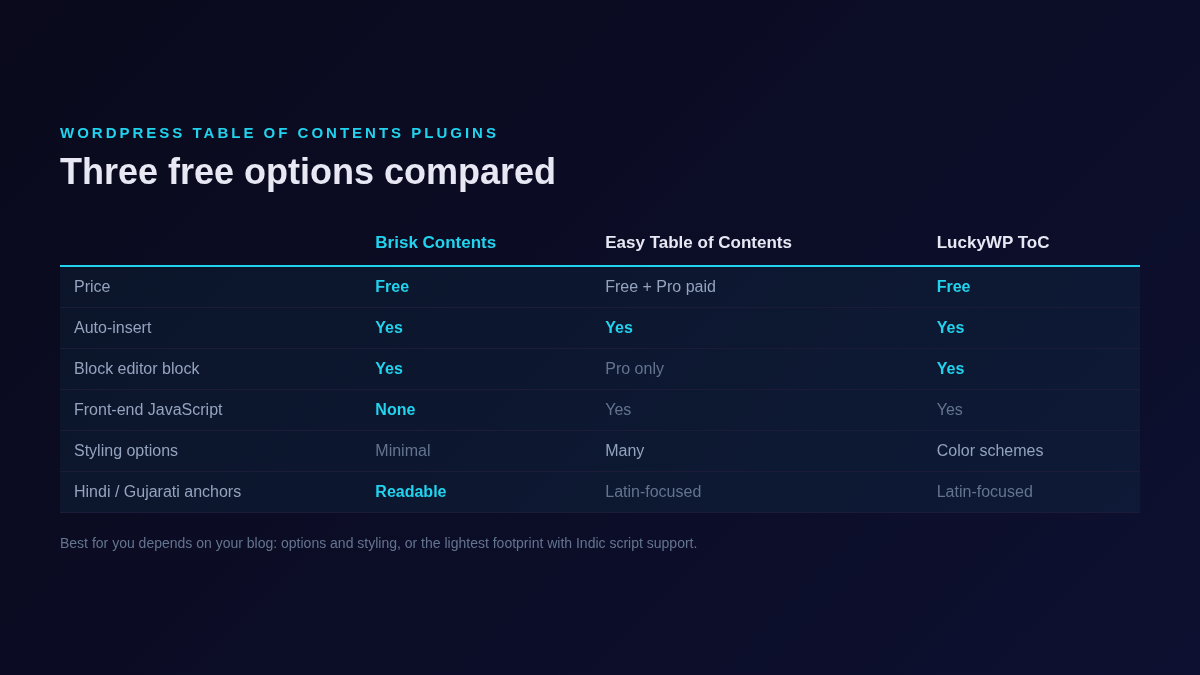
| Brisk Contents | Easy Table of Contents | LuckyWP Table of Contents | |
|---|---|---|---|
| Price | Free (GPLv2+) | Free core; Pro version sold separately | Free |
| Auto-insert | Yes | Yes | Yes |
| Block editor | Yes, block included | Gutenberg block is a Pro feature | Yes, block included |
| Shortcode | Yes | Yes, [ez-toc] | Yes, [lwptoc] |
| Front-end JavaScript | None | Yes | Yes |
| Styling options | Minimal by design (1 KB stylesheet) | Many options; more in Pro | Color schemes (dark, light, transparent, inherit) |
| Non-English headings | Readable anchors for Hindi and Gujarati | Latin-focused slugs | Latin-focused slugs |
| Extras | That is all, deliberately | Fragment caching, Elementor widget (Pro), many filters | Skip-headings rules, widget support, developer hooks |
Easy Table of Contents: the feature-rich default
Easy Table of Contents is one of the most installed ToC plugins and it shows. The settings screen covers everything: which post types get a table, which heading levels to include, where to position it, numbering styles, smooth scroll and more. It also has fragment caching to keep performance reasonable on busy sites.
Two things to know before choosing it. First, the Gutenberg block and the Elementor widget are part of the paid Pro version; the free plugin works through auto-insert and the [ez-toc] shortcode. Second, the large option set takes time to configure well. If you enjoy tuning settings, this is a strength. If you want the table working two minutes after install, it can feel heavy.
LuckyWP Table of Contents: the styling-focused choice
LuckyWP Table of Contents is also free and includes a Gutenberg block, a shortcode and a widget. Its strong point is appearance: built-in color schemes (dark, light, white, transparent or inherit from your theme), and rules to skip specific headings by text or level. Developers get a good set of hooks and filters, so it is easy to extend in a custom theme.
If matching your theme's look is the priority and you want to exclude headings selectively without code, LuckyWP is a solid pick.
Brisk Contents: the lightweight one I built
I built Brisk Contents because I wanted a table of contents that adds almost nothing to the page. It ships zero front-end JavaScript and a 1 KB stylesheet, so it will not slow down mobile readers. It supports the block editor, a shortcode and auto-insert, and it covers the basics without a big settings screen.
The specific problem it solves for Indian bloggers is anchor links. Many ToC plugins generate anchor IDs from heading text using rules built for English. When a heading is written in Hindi or Gujarati, those rules can produce anchors that are unreadable or stripped down to almost nothing, and the jump links stop making sense. Brisk Contents keeps readable anchors for Hindi and Gujarati headings, so a Hindi blog gets working, meaningful jump links like an English one.
Where Brisk Contents falls short
- Few styling controls. No color schemes or visual customizer. It is designed to inherit your theme and stay out of the way. If you want to restyle it heavily, you will write CSS or pick LuckyWP.
- No Pro tier extras. No Elementor widget, no fragment caching, no priority support. Easy Table of Contents Pro covers those needs.
- Newer and smaller. It has a shorter track record than the other two, which have years of user feedback behind them.
Which one should you pick
Pick Easy Table of Contents if you want maximum control and do not mind a settings-heavy plugin, or if you plan to buy Pro for the Elementor widget and extras.
Pick LuckyWP Table of Contents if appearance matters most: color schemes, skip rules and a widget, all free.
Pick Brisk Contents if you want the lightest option that just works, or if you write in Hindi or Gujarati and need anchors that keep working in your language.
All three are free to try, and switching between them is painless since they read the same headings. One practical tip before you commit: open your longest post on a phone, tap a few jump links, and scroll back up. The right plugin is the one where that flow feels instant and the table does not push your actual content too far down the screen. A table of contents should help readers, not become the content.
If you write in more than one language, also check the jump links on your non-English posts specifically. That is the step most comparisons skip, and it is exactly where the differences show up.
Try Brisk Contents
Free download from my store. Feedback from Hindi and Gujarati bloggers is especially welcome.
Download Brisk Contents Ask on WhatsApp